Samsung has quietly fixed one of the longest-standing pain points on Galaxy phones. With One UI 8.5 Beta 4, the Galaxy S25 Ultra finally gets proper, system-level voicemail handling — no carrier workarounds, no third-party apps.
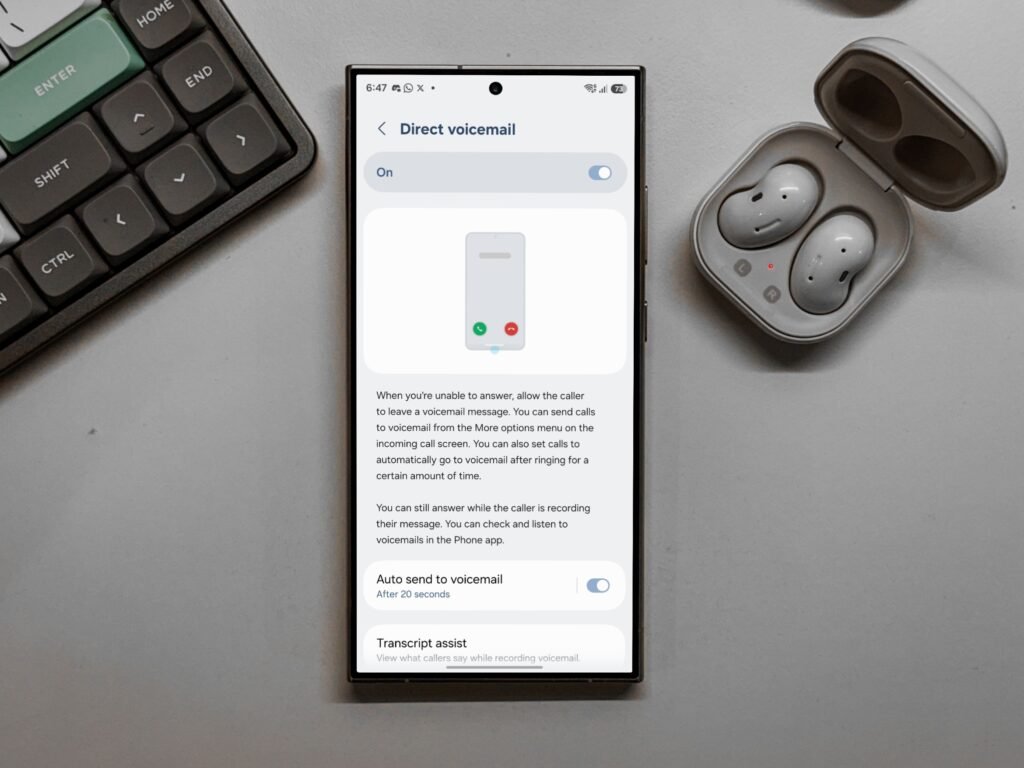
This update introduces Direct Voicemail, giving users full control over what happens when they can’t or don’t want to answer a call.
For anyone who takes a lot of calls, this is a small feature with a big quality-of-life impact.
Here’s what Direct Voicemail brings to the Galaxy S25 Ultra:
- Send incoming calls straight to voicemail from the More options menu
- Automatically route calls to voicemail after a chosen number of rings
- Answer the call while the caller is recording a voicemail
- Access, play, and manage voicemails directly inside the Phone app
No carrier-specific UI. No jumping between apps. Everything stays native.
Why this matters more than it sounds:
Until now, voicemail on Android — including Samsung phones — has been inconsistent.
- Many users relied on carrier voicemail numbers
- Some regions had visual voicemail, others didn’t
- Controls were limited or buried
- Managing missed calls often felt outdated
One UI 8.5 changes that by making voicemail a first-class feature, not an afterthought.
How Direct Voicemail actually helps day to day:
- You can decline calls without rejecting them outright
- Important callers can still leave context instead of calling repeatedly
- Spam calls get redirected without interaction
- You avoid awkward declines while staying reachable
It’s especially useful during meetings, travel, or focus hours.
Key behavior changes users should know:
- Calls can be routed to voicemail without alerting the caller
- You’re not locked out once voicemail starts recording
- Voicemail playback happens inside the Phone app, not through carrier menus
- No extra setup required once the feature is enabled
This makes Galaxy’s calling experience feel modern and intentional.
🚀 Need a Shopify Store That Converts?
I build fast, clean Shopify stores for DTC brands that want more sales, not just a pretty site.
Why Galaxy users have been waiting for this:
Apple has had system-level voicemail control for years. Android users, even on flagships, often didn’t.
Samsung closing this gap matters because:
- Calling is still critical for work and emergencies
- Messaging apps don’t replace voice in every situation
- Call control affects productivity and mental load
This update finally treats calls as something users should control, not just react to.
What’s the catch?
- The feature is currently part of One UI 8.5 Beta 4
- It’s rolling out first to the Galaxy S25 Ultra
- Wider availability will depend on Samsung’s stable release schedule and region
Still, its presence in beta strongly suggests a broader rollout is coming.
The bigger picture:
Samsung has been steadily refining One UI to remove friction from everyday tasks. Direct Voicemail fits that pattern perfectly.
It’s not flashy.
It’s not headline-grabbing.
But it solves a real problem millions of users deal with every week.
Sometimes the best updates are the ones that stop interrupting your day.
Leave a Reply