Apple has started rolling out iOS 26.2.1 to supported devices, bringing a small but important update focused on compatibility improvements and system stability. While this is not a feature-heavy release, it plays a critical role for users who rely on Apple’s tracking ecosystem and want a smoother day-to-day experience.
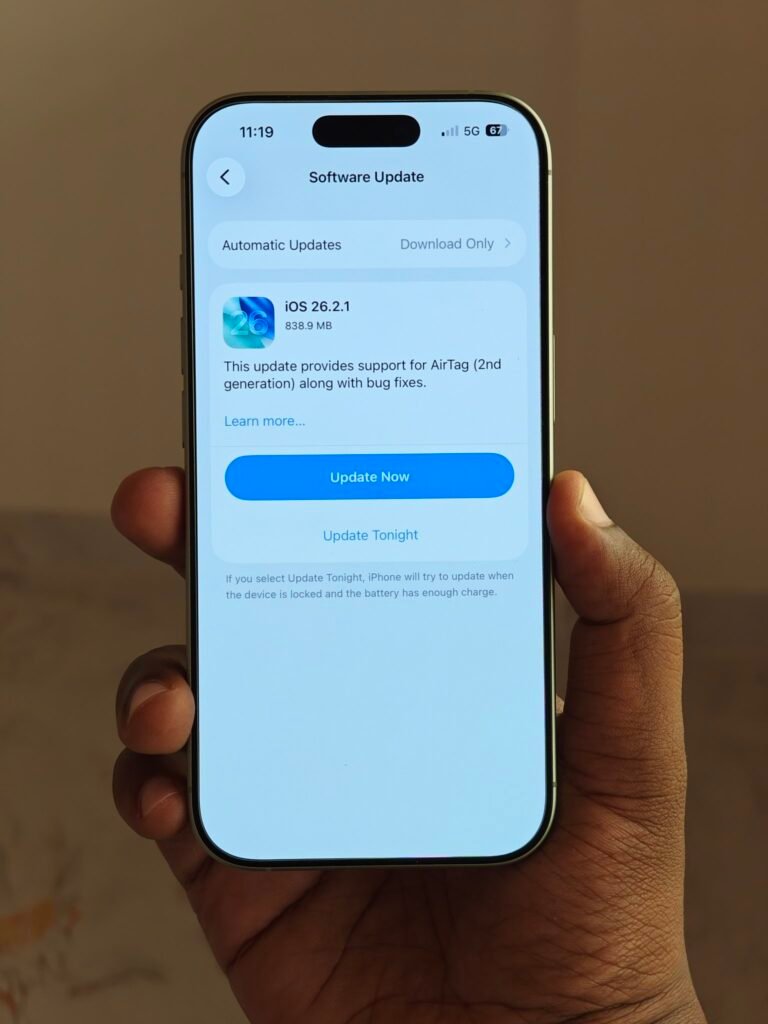
The update is currently rolling out in phases, so availability may vary depending on device model and region.
Key details of the iOS 26.2.1 update:
- Software version: iOS 26.2.1
- Update size: approximately 838.9MB
- Distribution: over-the-air (OTA) rollout
- Availability: staged rollout, reaching all users gradually
This update sits in the “maintenance release” category, meaning it focuses less on visual changes and more on under-the-hood improvements that keep devices running reliably.
What’s new in iOS 26.2.1:
- Adds full system-level support for AirTag (2nd generation)
- Improves background device communication for location accessories
- Includes multiple bug fixes across core system services
- Enhances overall system stability and performance consistency
The most notable addition is compatibility for the second-generation AirTag. With this update installed, newer AirTag hardware integrates properly with Find My features, background scanning, and location updates.
Why this update matters for everyday users:
- Ensures accurate tracking with newer AirTag hardware
- Prevents sync issues between accessories and iPhones
- Reduces background errors that can drain battery or cause lag
- Improves reliability for users who depend on location tracking
Even if you don’t use AirTags, the bug fixes bundled in iOS 26.2.1 can still improve device behavior in subtle but important ways, especially related to connectivity and background services.
What Apple is fixing behind the scenes:
- Minor crashes reported after iOS 26.2 rollout
- Inconsistencies in Bluetooth and accessory detection
- Background service stability issues affecting Find My
- General system responsiveness under prolonged usage
Apple typically doesn’t publish a full public changelog for point releases like this, but such updates are usually recommended for all users due to their cumulative fixes.
How to install iOS 26.2.1:
- Open Settings
- Go to General
- Tap Software Update
- Download and install iOS 26.2.1
Make sure your device has enough free storage and at least 50% battery, or keep it connected to a charger during installation.
Who should update immediately:
- Users planning to buy or already using AirTag (2nd gen)
- Users experiencing bugs after iOS 26.2
- Anyone prioritising security, stability, and smooth performance
For most users, iOS 26.2.1 is a safe and recommended update. It doesn’t change how your phone looks or works day-to-day, but it quietly improves reliability — exactly what maintenance updates are meant to do.
More updates are expected in the coming weeks as Apple continues refining iOS 26 ahead of larger feature releases.
Leave a Reply