Telegram has started rolling out one of its most noticeable Android design updates in recent years. The new interface shifts away from the familiar utilitarian layout and moves toward a softer, more modern visual language that closely aligns with current platform trends.
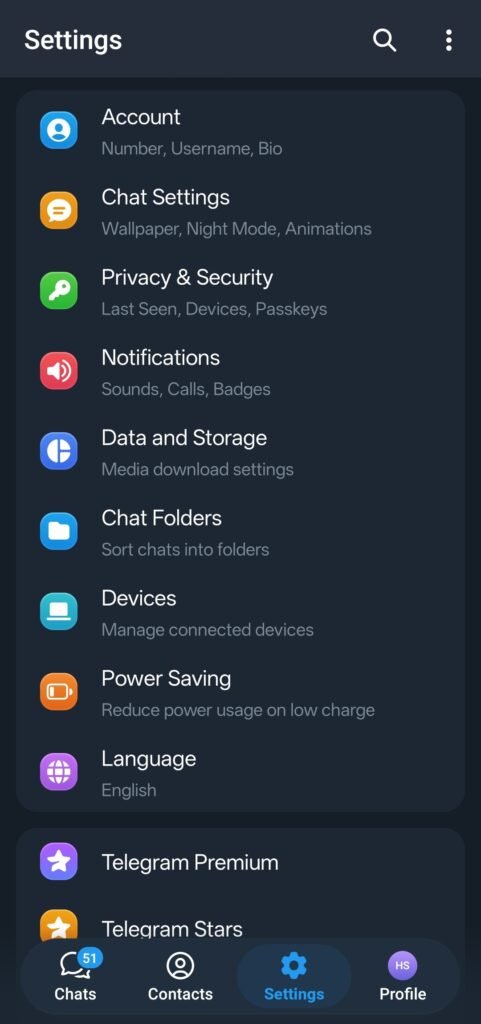
The update is arriving gradually, so not every Android user will see it immediately. Early access users and select regions appear to be getting it first, with a wider rollout expected over the coming weeks.
This redesign is not about adding new features. It’s about how Telegram feels when you open it, scroll through chats, or jump between sections.
Here’s what’s changing and why it matters.
Telegram’s updated Android interface focuses heavily on visual polish and navigation clarity.
Key design changes include:
- Rounded cards across chats, menus, and content sections
- Blur and translucent “liquid glass” effects layered behind UI elements
- Softer iconography with more breathing room between elements
- Cleaner spacing that reduces visual clutter
The overall result is a calmer, more fluid interface that feels less dense than the previous design.
One of the biggest functional changes is the navigation system.
Telegram is moving away from the classic side menu and introducing a floating bottom navigation bar.
What’s included in the new bottom navigation:
- Chats
- Contacts
- Settings
- Profile
This mirrors modern Android and iOS navigation patterns and makes one-handed use easier, especially on larger screens.
For long-time users, this may take some getting used to. The side drawer has been a core part of Telegram’s identity for years.
The update also makes Stories more visible.
Instead of being tucked away, Stories now have clearer placement within the interface, making them harder to miss. This aligns with Telegram’s recent push to treat Stories as a first-class feature rather than an optional extra.
The search experience has also been refined.
Search updates include:
- A redesigned search bar
- Reduced header height
- Faster visual access to results
These changes aim to make searching chats, media, and contacts feel quicker and less intrusive.
Visually, the redesign leans toward an iOS-inspired aesthetic, even on Android.
That includes:
- Translucent layers instead of solid blocks
- Floating elements instead of fixed panels
- A more “glass-like” UI treatment
Telegram appears to be prioritizing consistency across platforms, which could make switching between Android and iOS feel more seamless.
Performance has not been ignored.
Telegram has added options that allow users to reduce visual effects if they prefer smoother performance over visual flair.
Users can:
- Disable or reduce blur effects
- Tone down animations on lower-end devices
This ensures the redesign doesn’t force heavier graphics on phones that may struggle with them.
User reactions so far have been mixed.
Some users welcome the cleaner look and modern navigation, calling it overdue. Others feel the redesign removes Telegram’s distinct Android personality and brings unnecessary visual complexity.
This split response is expected with any major UI change, especially on an app used daily by millions.
Why this update matters:
- Navigation is now faster and more thumb-friendly
- Visual clutter is reduced for easier reading
- Telegram aligns its design across Android and iOS
- Users get more control over performance vs visuals
For power users, the core functionality remains unchanged. For new users, the app now looks more approachable and modern.
As the rollout continues, Telegram may tweak elements based on feedback, as it has done with past UI experiments.
Leave a Reply