Competitive PC gamers are flagging a serious performance issue tied to a recent Windows 11 update, and the impact is hard to ignore.
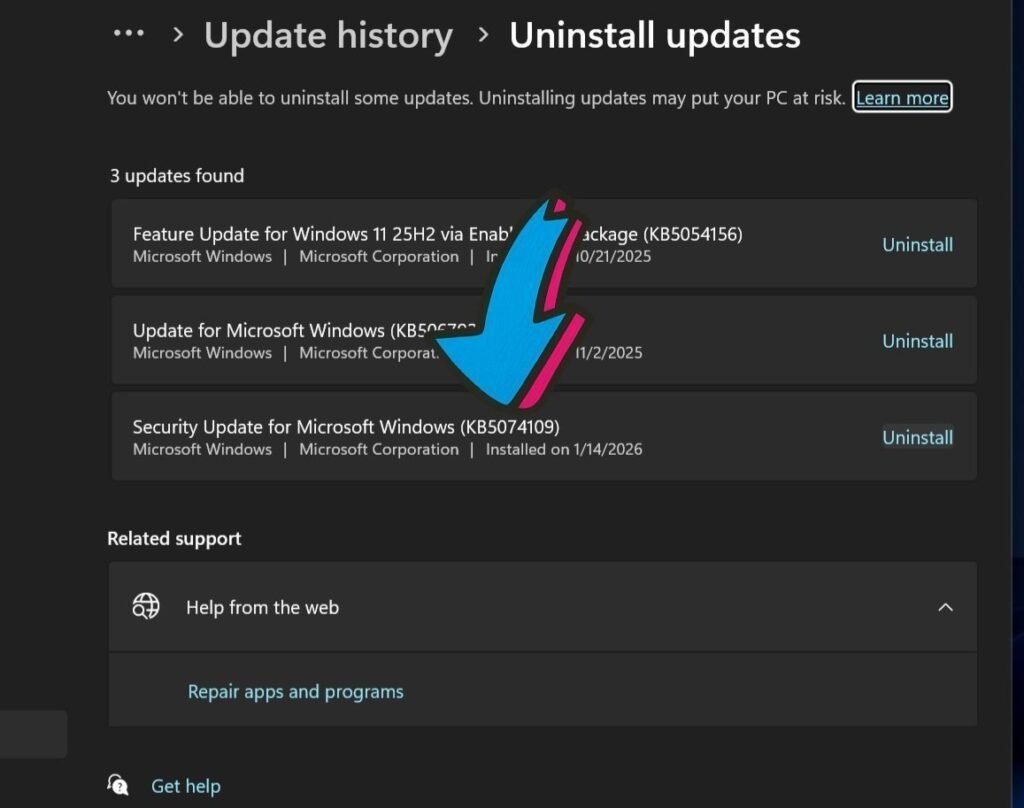
Windows update KB5074109 has now been widely reported to cause noticeable gaming slowdowns on systems running NVIDIA GPUs. Multiple users and performance tests point to clear regressions that directly affect frame rates and gameplay stability.
This is not a minor edge-case bug.
For anyone playing fast-paced or competitive titles, the issue can significantly change how games feel.
What’s going wrong with KB5074109
After installing the update, affected users are reporting:
- 15–20% FPS drops across multiple game engines
- Persistent frame stutter, even on high-end systems
- Inconsistent frame pacing during camera movement
- Micro-freezes that don’t show up in performance overlays
The problem appears across a range of NVIDIA GPUs, not limited to one specific generation.
This suggests the issue is rooted in how the update interacts with GPU scheduling, drivers, or low-level system components rather than individual games.
Why this matters for competitive gamers
For casual play, a small FPS drop can be tolerable.
For competitive players, it’s not.
Performance regressions like this affect:
- Reaction time in shooters
- Frame consistency in esports titles
- Input latency during fast camera movement
- Visual clarity when tracking opponents
Games that rely heavily on stable frame delivery suffer the most. Even powerful GPUs can feel sluggish if frame pacing is broken.
If your setup felt “off” after a recent Windows update, this is likely the reason.
Who is affected
Reports so far indicate the issue primarily impacts:
- Windows 11 users
- Systems with NVIDIA GPUs
- Players who installed KB5074109 recently
AMD and Intel GPU users have not shown the same scale of complaints, pointing to a compatibility issue specific to NVIDIA’s driver stack or GPU scheduling path.
How to fix the issue right now
Until Microsoft releases a patched update, the most reliable solution is to remove KB5074109 manually.
Steps to uninstall:
- Open the Windows search bar
- Type Uninstall Updates and open it
- Locate KB5074109 in the list
- Select Uninstall
- Restart your PC
Users who’ve done this report:
- FPS returning to normal levels
- Stutter disappearing immediately
- Games feeling responsive again
This rollback does not affect your files or installed applications.
🚀 Need a Shopify Store That Converts?
I build fast, clean Shopify stores for DTC brands that want more sales, not just a pretty site.
Should you pause Windows updates?
If gaming performance matters to you, especially in ranked or competitive play, it’s worth:
- Pausing optional updates temporarily
- Waiting for confirmed stable builds
- Monitoring patch notes before installing cumulative updates
Windows updates increasingly include under-the-hood changes that can affect graphics pipelines and driver behavior.
What happens next
Microsoft is expected to acknowledge the issue once enough telemetry and user feedback accumulates. NVIDIA may also release a driver-side mitigation if the root cause overlaps with GPU scheduling or rendering paths.
Until then, uninstalling KB5074109 remains the safest option for affected gamers.
Bottom line
If your NVIDIA-powered PC suddenly lost performance after a recent Windows update, this isn’t your imagination.
Rolling back KB5074109 can restore smooth gameplay immediately, saving you from unnecessary driver tweaks, game reinstalls, or hardware troubleshooting.
Leave a Reply